


Bash Security Vulnerability Patched (CVE-2014-6271)
On September 24, a serious vulnerability was found in bash, a shell which is ubiquitous on Linux systems. If exploited, this vulnerability could allow arbitrary code to be run on the system. There are a number of different scenarios under which this vulnerability could be exploited, and it affects virtually all versions of bash.
We would like to reassure our customers that that we have patched all of our servers, and have verified that we are currently not vulnerable to this security issue. We have found no evidence that this vulnerability was used against any of our servers. We will continue to follow the development of this issue closely. Please contact us if you have any questions.
UPDATE: The patch for CVE-2014-7169 has now been applied as well on all our servers.
The Heartbleed Bug

On April 7 a security vulnerability in the OpenSSL library was discovered. Named the Heartbleed bug, it has the potential to leak up to 64k of memory on a vulnerable server. This could potentially leak the SSL private key, which would then allow an attacker to decrypt HTTPS traffic to the server.
OpenSSL is used by a majority of web servers worldwide, including RepositoryHosting.com. Fortunately, though, the version of OpenSSL that we are running was not affected by this vulnerability. Therefore, there is no need to rotate your credentials at this time (though rotating your passwords periodically is generally good practice anyway).
We have checked with all the third-party service providers that we use, and they have all patched their systems now. We are rotating all our credentials for their services.
If you have any questions about this, please don't hesitate to contact us at support@repositoryhosting.com.
Support for Additional Languages in Trac
New Languages
We have customers from all over the world, and we are always looking at ways to make our service more international. To help work towards that goal, we have just enabled support for an additional 27 languages in Trac, including everything from Brazilian Portuguese and Hebrew, to Japanese and Swedish. See this page for a full list of the languages; we have enabled support for all languages with at least 75% of their translations finished. We want to thank the Trac community for providing these valuable translations.
Note that although these languages have been enabled in Trac, the rest of our interface, such as the Account Dashboard and support pages, are still only available in our three fully-supported languages: English, Russian, and Simplified Chinese. To update your language settings, simply go to the "Languages and Dates" tab on the Account Settings or My Profile pages.
Upgrades
We have also recently upgraded our repository systems to the latest versions, to keep pace with their rapid development. Subversion has been upgraded to 1.8.3, Git to 1.8.4, and Mercurial to 2.7.
You may have noticed that things have been a bit quiet on the blog recently, as we have been focusing our efforts on infrastructure improvements and other internal projects. However, we have a number of new features planned, so stay tuned.
Diffs in Your Notification Emails
Notification Improvements
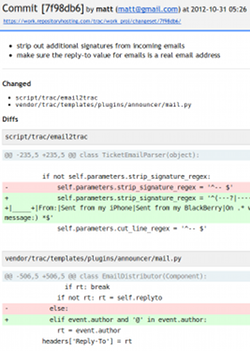
I'd like to point out a few changes to our email notifications that we have deployed over the past week. Probably the most exciting is that commit notifications now include a list of all the changes that were made to the committed files. This is shown as a standard unified diff, and saves you time by enabling you to see the changes without having to click through to Trac.
You may enable this feature by going to the Notifications tab on the Project Settings page and selecting the Diffs option. You can also enable it for an entire Category. Note that all new projects will have diffs enabled by default.
While making these additions to our commit notifications, we also did a visual refresh of all our notification messages. The new look includes larger text, a more consistent feel across notifications, and better support of mobile devices.
Replying to Notifications
In a further step to help you to do more from your email, we have added the ability to reply to ticket and commit notifications. This has been a long-requested feature, and allows you to reply back to the person who made the commit or ticket change that you are being notified of. That way you can further discuss the changes that were made. Additionally, if you select the CC option for ticket notifications (see the Notifications tab of the Project Settings page), then everyone who was notified will be included in the email's CC list. Then you can reply-to-all for a group discussion.
We have also integrated this with our Incoming Email feature. Incoming Email allows you to create an email box that your users can send bug reports to, which will then be automatically converted into Trac tickets. Now you can optionally specify an email box that all notification replies go to, so that you can make further changes to the ticket without leaving your email. This includes adding comments and changing ticket attributes. Further notifications would be sent out in response to your changes, continuing the conversation. This option is available on the Incoming Emails tab of the Project Settings page.
We use the email2trac Trac plugin to provide this functionality. For more details on the format for changing tickets, see this page.
Better Performance
You may have also noticed the pages on our site loading a bit faster over the last week. We have been deploying some performance-related changes and have measured a significant improvement, especially in Trac.
We hope you enjoy the new features! Please let us know what you think about the email and performance improvements by leaving a comment below.
Pay with Moneybookers/Skrill

I'm happy to announce that we now support a new payment method, Moneybookers (which is currently being rebranded as Skrill). This new integration allows us to offer more payment options and to better support our customers around the world. We have heard from a number of you that you are unable to use Paypal in your area, but can use Moneybookers. Currently, it looks like Moneybookers is supported in 205 countries compared to Paypal, which supports around 201 countries, and their lists of countries differ somewhat.
We plan to continue adding new payment options in the future. If you have a preferred payment system that we don't yet support, please leave a comment below and let us know.
Prepaying for your Account
We have also just added support for making one-time payments to prepay for your account for any period of time. This can be useful if you'd like to pay at a different interval, such as annually or quarterly, or if you are having trouble getting the automatic monthly payments to work. We have found that a few of our customers have been restricted by their financial institutions from setting up recurring payments, and this should allow them to work around this. This prepayment feature is now available on the Billing tab of the Account Settings page.
Repository Hosting Speaks Russian
I know it's been a little quiet on the blog here lately, but we've been working hard on a number of new features that we will be releasing soon. Today we are announcing the first one: Russian language support! We have quite a few customers from Russia, and we are now supporting Russian on our home page, support pages, Account Dashboard, and in Trac.
You may switch your account to use Russian from the "Languages and Dates" tab of the Account Settings page. Or, if you would only like to change the language for yourself and not everyone else in your account, you may do so from your My Profile page.
We have some good stuff coming up in the next few months, so keep watching this blog for the announcements. And please leave us a comment with feedback about the translation, or to let us know which other languages you would like to see us support in the future.
Faster Performance with Subversion 1.7
We are excited to announce that we have now fully upgraded our servers to Subversion 1.7.1, Git 1.7.7.3, and Mercurial 2.0. The latest versions contain new features, bug fixes, and performance improvements. See the above links for a full list of what is new.
Subversion 1.7
The upgrade to Subversion 1.7 is particularly interesting. This new version should allow significantly faster access over HTTP(S) due to the addition of what they call HTTPv2. To take advantage of the performance boost, you will need to upgrade your Subversion client to version 1.7 as well, and we recommend that all of our customers do this.
Upgrading your client will also upgrade your checked-out repositories to use the new WC-NG metadata management system. The biggest change here is that you will no longer have .svn directories strewn throughout your project. Now, all repository information will be stored in a single .svn directory at the root of your repository.
Also, Subversion 1.7 comes with a new svnrdump tool that allows you to download a dump of your repository directly from the command-line. You will no longer need to download a backup of your project in order to export your repository as a dump file. You can use this new feature as follows:
svnrdump dump https://myaccount.repositoryhosting.com/svn/myaccount_proj > proj.dump
There are many other changes in the latest version, such as patch support, better merge tracking, and improvements to the serf library. Check out the release notes for the full list.
Repository Hosting is now Bilingual

We have always intended Repository Hosting to cater to an international audience. It is one of the reasons we have priced our services as we have. While other companies have set their prices based on what they think they can get out of their customers, we base ours on what it costs us to actually provide the hosting.
By pricing our services as low as we can, we hope that they will benefit as many people as possible. Whether you are on a small development team in China or Belarus or a large corporation in Brazil, whether a student at university in India or Germany or a consultant in California, whether you have one project or hundreds, Repository Hosting is here to provide you with the tools you need to manage your software development. We are excited to further support our international audience by providing our services in new languages and soon, in new regional data centers.
Chinese Language Support
We decided to start with the largest language group in the world, and are happy to announce that we now support our services in Simplified Chinese. We have quite a number of Chinese customers already and some knowledge of Mandarin Chinese on our team, so it seemed like a natural language to start with. You can click the Chinese flag at the top of this page to take a look.
If you would like to switch the language setting of your account over to Chinese, you may do so easily from the new "Languages and Dates" tab on the Account Settings page. Individual users can also set their language preferences from the My Profile page, and these will override the account settings. These settings affect both the Account Dashboard and Trac (many thanks to everyone who contributed to the Chinese translation of Trac).
Dates and Times
In addition to Chinese language support, we have also added other localization options. You can now specify your preferred timezone, and date and time formats. These settings can also be found on the "Languages and Dates" tab, on the Account Settings and My Profile pages.
What do you think?
How's the translation? Any suggestions about our new features? What other languages would you like to see us support? Please let us know if you have any feedback or ideas by leaving a comment below or sending us an email at support@repositoryhosting.com.
Git over Smart HTTP and svn+ssh Support
We have just added three new ways to access your repositories:
Subversion over svn+ssh
If you've ever tried working with a Subversion repository containing tens of thousands of files, you will know how slow checkouts and commits can be. One of the reasons for this is the fact that SVN uses one or more HTTP requests for each file you are checking in or out. To speed things up, we have just added support for the svn+ssh protocol, which tunnels your request over SSH, skipping the web server completely. Not only is this much faster, but using SSH keys can be more secure too. To get started, you will need to create an SSH key if you have not already done so and add it on your My Profile page. Then checkout your repository using the svn+ssh:// URL listed on the Account Dashboard. To switch an existing repository to svn+ssh, use a command like the following:
svn switch --relocate \
  https://myaccount.repositoryhosting.com/svn/myaccount_myproject \
  svn+ssh://svn@myaccount.repositoryhosting.com/myaccount/myproject
Git over Smart HTTP
Although SSH is generally the preferable method of accessing your repositories, sometimes you find yourself in a situation that requires HTTP access. The most common situation is probably restrictive corporate firewalls that block SSH connections. To help keep you connected to your code at all times, we have also just added support for Git over Smart HTTP. This is a feature supported in the 1.6.6 and newer versions of Git that allows you to push and clone your repositories over HTTP. It is "smart" in that the protocol is Git-specific and very efficient. Using HTTP also lets you connect to your repository quickly in situations where it might be cumbersome to set up SSH keys. The new http(s):// URLs are listed on the Account Dashboard.
GitWeb, et al.
So what happens if you go to the new Git HTTP URLs in your browser? We now serve up GitWeb, which is the official web-based browser for Git repositories. If you are looking for an alternative to Trac's repository browser, you'll want to check this out. GitWeb is fast and provides a much more Git-specific interface to your repository. It displays branch and tag labels on your commits, allows you to download patches, and provides a more detailed log than the Trac interface does.
If you're a Mercurial user, we have something for you too. We've always provided the "hgweb" web interface to Mercurial repositories, but we have just upgraded it to fit more nicely with the Repository Hosting look and feel. To access it, simply click the link provided in the project information on the Account Dashboard.
You've also always been able to get a simple directory listing of your Subversion repository or WebDAV shared drive by browsing to its' HTTP URL in your browser. However, we have now upgraded the display of these services, so they should look a little less... plain.
Blogs, Tags, and Custom Ticket Fields
Today we are releasing our third round of plugins, which will add support for a project blog, tagging, and the ability to create new ticket fields. This completes our month of new plugins, and we see that already many of you are taking advantage of the new features. If there is a Trac plugin you would like to use that we don't yet support, just let us know, and we will add it to our list for a future release.
Project Blog
Keep your clients or co-workers up-to-date with a project blog. This plugin adds support for blog posts with comments, along with various ways to browse your archive of posts. You can also add attachments to your posts, and use macros to add blog information to your wiki pages.
Tags
This plugin allows you to categorize all your tickets, wiki pages, blog entries, and forums by tagging them. Don't want to enter tags for all your old tickets? Don't worry, this plugin will automatically take the Keywords field from tickets (and the Category field from blog posts) and turn them into tags. It also adds a new Tags tab in Trac with a tag cloud that lets you browse your tagged items.
Custom Ticket Fields
We know from your feedback that many of you would like to add custom fields to your tickets, and this plugin will let you do just that. Fields may use one of a number of input methods, including textboxes, checkboxes, radio buttons, dropdown lists, and textareas.
More Plugins, including a Workflow Editor
This week we are adding support for a second batch of plugins, including the oft-requested Workflow Editor. We expect these plugins will increase the productivity of many of our customers. Be on the lookout for our third round of plugins, coming next week.
Workflow Editor
This plugin adds a Workflow tab to the Admin section of Trac which allows you to modify ticket workflows. It lets you change the default list of statuses (new, assigned, accepted, reopened, and closed) to allow a ticket to be in other states. It also lets you define new actions that can move the ticket from one status to another. For example, if you wanted to add a step to your workflow where the QA department gets a chance to test a resolved ticket before it is closed, you could add a new status called "testing" and change the "resolve" action to move the ticket to this status. Then you would create two new actions, "pass" and "fail", which would move the ticket from the "testing" status to the "closed" or "reopened" status, respectively.
Ticket Importer
If you've ever needed to import tickets from a source other than Trac, this plugin can save you a lot of time and effort. Simply upload an Excel or CSV file with one ticket per row, and this plugin will import them for you. You can even update existing tickets this way, by downloading your current tickets in CSV format, making the necessary changes, and then importing the file.
Markdown Support
If you're coming to Trac from a system that used Markdown for its formatting syntax, this plugin may come in handy. It allows you to enter Markdown-formatted text in wiki pages. You could use this if you're more comfortable using Markdown syntax, or if you need to import some pages that are formatted with Markdown.
Discussion Forums and Other Plugins
After our upgrade to Trac 0.12 in January, we decided it was time to add support for some more Trac plugins. We have been tracking the plugin requests that our customers have been making, and have determined a number of plugins that we believe will be useful for many of our customers. Today we have launched the first batch of new plugins. Our plan is to release a couple more batches of plugins over the next few weeks.
Discussion Forums
This plugin adds a "Forums" tab to Trac that lets you manage a set of discussion forums. You can use Trac permissions to determine who can post to forums, and you can also set a list of moderators. Forums may also be placed into groups to help keep things organized. Users may subscribe to Forums or Topics and then receive email updates for them. This is a great way to collaborate as a team or to build a community around your project.
Batch Modify Tickets
Have you ever needed to make the same change to a dozen tickets? It can get pretty tedious. Now you can simply enable this plugin and make all your changes in one operation. Maybe you need to close a bunch of tickets or assign them to another milestone. Simply go to the "View Tickets" tab and click on "Custom Query" in the top-right corner of the page. This will let you construct a query that will match the tickets you would like to change. Then click to expand the "Batch Modify" box at the bottom of the page, which allows you to make the changes to the tickets.
Spam Blocker
If you've opened your Trac projects up so that anonymous users can post tickets, you may have run into problems with spam. Enabling this plugin will help avoid this situation by placing a captcha on the New Ticket page for any users that don't have the CAPTCHA_SKIP Trac permission. We use the popular reCAPTCHA as our captcha of choice. Note that you will most likely want to place the CAPTCHA_SKIP permission on the "authenticated" group, so that only anonymous users can see the captcha.
Recently Added Features and Trac 0.12 this Weekend
I know the blog has been a little quiet lately, so I wanted to update you with what we've been doing here at Repository Hosting. Over the last few months we have added a number of new features to our services, and we are planning a major upgrade for this weekend.
Automated Trac Imports
You can now easily import existing Trac Projects into Repository Hosting. Simply go to the Project Settings page, select the General tab, and next to the Trac field you will see a link to import a Trac project. Upload your project, and it will be imported within minutes.
Trac Permissions
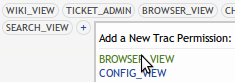
We have added the ability to set Trac permissions directly from the Project Settings page on the Permissions tab. This allows you to set all your permissions from one location, instead of having to login to Trac to set Trac-specific permissions. Simply click the + button on the right to add a new permission, or hover over an existing permission and click the X to remove it.
reStructuredText
We have enabled support for reStructuredText in Trac. This is an alternative markup format that is commonly used for Python documentation.
Upgrades are Coming
This Saturday, Jan 15 from 3am-4am EST, we are planning to upgrade a number of our hosted services. The following is a list of the upgrades. Note that Subversion has already been upgraded to the latest version, 1.6.15.
- Git 1.7.0.6 → 1.7.3.5
- Mercurial 1.5.1 → 1.7.3
- Trac 0.11.6 → 0.12.1
- Agilo Plugin 0.8.3.2 → 0.9.2
- Downloads Plugin 0.2 → 0.3
- Timing and Estimation Plugin 0.9.2b → 1.0.7b
- Worklog Plugin 0.1 → 0.2
- Wysiwyg Plugin 0.2 → 0.12.0.3

Trac 0.12
The big upgrade, of course, is to Trac 0.12. The new release includes improved user interfaces for editing wiki pages and tickets, including automatic previews, along with many other small changes. There are two big features of Trac 0.12 you won't see right away, though: translation into other languages and multiple repositories per project. Don't worry, if you are looking forward to those features they are coming soon. We just need to integrate those features with our other services so that the user experience is seamless.
A Happy New Year from all of us at Repository Hosting!
HTML Email Notifications

One feature request we have often heard from our customers is to deliver the notification emails in HTML. The reason for this is that many email readers, such as Gmail, use dynamic-width fonts for displaying text emails, and this makes the default ticket notifications from Trac hard to read. Well, we have not only added HTML emails, but we have also revamped our entire notification system.
Each user now has full control over their notification settings from the My Profile page. From there, they can specify separate notification settings for each project they belong to. The following notification types are offered:
- Repository Commits: Every time a commit is made to the project's repository.
- Ticket Changes: Every time a ticket is created or modified.
- Wiki Changes: Every time a wiki page is created or changed.
- Backup Completions: Every time an automated backup has been completed. You may then choose to download the backup.
- Invoices: For account administrators, a copy of the monthly invoice is sent each time the account is billed.
Tickets
You may specify which tickets you would like to receive notifications for:
- All: All tickets regardless of your involvement with the ticket.
- My Components: Tickets whose component you are an owner of.
- Owned By Me: Tickets that you own.
- Reported By Me: Tickets that you are the reporter of.
- Updated By Me: Tickets you change.

Watch This
You may also specify specific wiki pages and tickets that you would like to receive notifications for, regardless of your notification settings. To do this, simply click the "Watch This" link in the top-right corner of the screen when you are viewing a ticket or wiki page. To stop watching an item, simply click the "Unwatch This" link.
By default, all notification emails have now been switched to use HTML by default. However, if you would like to return to plain text emails, you may choose to on your My Profile page. We hope you enjoy this new feature, and of course we always welcome your feedback on how to make our services even better.
New Dashboard
One of the top reasons why our customers choose Repository Hosting is that we allow them to have as many projects and users in their account as they'd like, at no additional charge. We just don't believe in charging extra based on artificial metrics such as the number of projects. As a result, 1/6 of our customers have 10 or more projects in their account, and some have more than 50. However, until today, managing large numbers of projects and users could get a bit cumbersome.
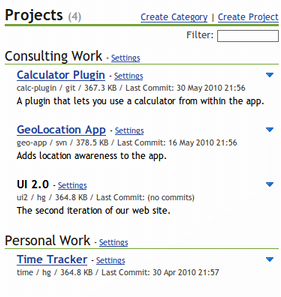
Today we have rolled out a brand new version of the account dashboard, an updated permissions interface, and various enhancements throughout our service. The purpose of these changes is to make managing large numbers of projects and users easy and efficient. We have streamlined many of the commonly performed actions and added additional data to the dashboard. The biggest change is the ability to group projects into categories and users into groups. You can then set permissions on a category and they will be inherited by all the projects within that category. The same thing is true for groups and users.
Changes and Features
Dashboard- The list of projects or users may be instantly filtered by typing into the filter box.
- Projects and users are now created right from the Dashboard. The "Create and Add Another" button may be used to quickly create multiple users.
- Additional information, such as repository type, disk usage, and last commit date is listed under each project in order to better identify and compare them.
- Projects and users are now visually grouped.
- Projects may now be archived. Archived projects will still take up space, but they will become inaccessible and not be listed on the dashboard.
- Similarly, users may be disabled, in which case they cannot log in.
- Projects may now be forked. This creates a new project that has a copy of the original repository.
- Similarly, projects may now be copied, which makes a complete copy of the repository, shared drive, Trac data, settings, and permissions. This is useful when using one project as a template for new projects.
Permissions
- The permission page has been moved to a tab on the Project Settings page.
- Permissions may now be set from the project, category, user, or group settings pages.
- Trac permissions, such as WIKI_READ, that have been assigned to users are now listed on the permissions page.
General
- The width of the pages has been increased to match the Trac layout.
- Trac may be completely turned off for a project.
- Incoming email can now be managed from the Project Settings page, instead of the Account Settings page.
Check out the new changes and let us know what you think. Now go create some more projects!
Performance Improvements
We hope you have seen some improvements in the performance of Repository Hosting recently. Over the last couple of weeks we've made a number of upgrades and optimizations that should improve your experience with our services. One of the changes we made was moving to more powerful servers. As you know, we use Amazon's excellent EC2 service, and we just upgraded our servers from "c1.medium" 32-bit instances to "m1.large" 64-bit instances. This gives us significantly more memory, which had been a bottleneck earlier. Additionally, we have identified a number of slow actions in our code and rewritten them, giving a noticeable performance boost to the dashboard page, especially for accounts with many projects.
We are currently finishing up a number of new features and UI improvements that will be released soon. These new features are aimed at providing more efficient ways to manage large numbers of projects and users, and generally improving the user experience. They include a completely revamped dashboard. Expect to see the release of these new features within the month.
Mercurial Repositories

We are excited to launch support today for Mercurial repositories. Mercurial, cleverly abbreviated Hg, is a distributed version control system originally created for Linux kernel development, though Linux went with Git instead. It is currently used by many projects including Firefox and OpenOffice. Although it has a smaller market share than Subversion or Git, it is quickly growing in popularity.
Mercurial vs Git vs Subversion
Mercurial is very similar to Git. It is distributed, meaning that every copy of the repository contains the full history. As a result, commits and most other commands are local operations and therefore very fast. You only interact with Repository Hosting when you hg push your commits up to your project, or hg pull others' changes down to your local repository. Mercurial is very lightweight and can be used on projects of any size, from something as big as an open-source project like Firefox down to versioning your local documents folder.
A few improvements over Git that Mercurial offers is that it is a bit more intuitive to use and has great documentation. It also labels commits with both Git-style hashes and SVN-style integers, a compromise that makes it easier to follow the flow of commits. Git, though, is better for power users as it provides greater flexibility and control over the workflows.
The difference between Mercurial and Subversion is the difference between distributed version control systems and centralized ones. Although Subversion's workflow is a little bit simpler, it lacks the speed, offline usability, and excellent branching and merging of Mercurial. A good overview of the similarities and differences of the major version control systems can be found here.
Give it a try
All of our features, such as Trac plugins, notifications, and commit messages now support Mercurial. To use Mercurial, simply create a new project in your account and select Mercurial as the Repository System. We hope you will enjoy this new Repository Hosting feature!
One Year of Repository Hosting
It has been one year since we launched Repository Hosting to fight the injustice of overpriced and unreliable hosting, and in that time we have seen many people come join our band of renegades. We believe that many of you share our frustration with the other hosting services out there, and we have enjoyed developing a service that is simple and reliable in contrast. After launching Repository Hosting last year, we immediately started enhancing our service with powerful new features. We have had the opportunity to talk with many of you and listen to your feedback, and we know that many of you have enjoyed using Repository Hosting as much as we have creating it.
How far we've come
We believe strongly that our customers should not be charged more for additional features that cost us nothing. This is the basis of our motto One Plan, One Price; we will never nickel and dime you, no matter how many features we add. Over the last year we listened to your feedback and have strived to build Repository Hosting into a service that is powerful, simple, and enjoyable. Some of the features we have been busy adding include:
- Eclipse integration
- Free automated backups, including uploading to S3
- Emailing tickets into Trac
- Updating ticket status from log messages
- Sending notifications to Twitter, Campfire, Basecamp, CIA
- Shared Drives with WebDAV access
- Custom themes, logos, and domain masking
- Agile workflow support via Agilo
- Time Tracking support
- Trac plugins
Our Goals for the next year
We have big plans for this year. We are continuing to add the serious features you expect from a repository hosting service, only at our simpler, fairer pricing model. We don't want to give anything away too early, but there are some big features coming out soon. Ok, here's one hint: Mercurial.
One thing we would like to improve this year is our communication with you, our customers. That means more frequent blog posts and tweets (@rephosting). It also means better updates to our status page, as there were a few instances this past year where the page was not updated when we had an issue. We are also looking into other methods for improving communication between us and our customers.
We learned this year that our customer base is extremely diverse, as we have customers from all over the world. One of our goals is to make Repository Hosting the most international friendly hosting service. Our plans include data centers in new locations and support for additional languages. If there is a language you would really like to see offered, please let us know, if you haven't already.
As always, we are here to serve you, so let us know if you have any feedback on our services, or if you have any suggestions for new features. Thank you for a great first year.
The Renegades at
Repository Hosting
Time Tracking and More
Time is money. But how much money? To answer that question, you have to be able to track your work time, and we decided to add some plugins to help you do just that. The popular Timing and Estimation plugin allows you to track both the estimated and actual time worked on a ticket, and it includes a number of time reports that readily summarize the work done by your team. It even has a nice feature that lets you "clock in" when you start working on a ticket.
We have also added three more plugins based on your feedback. The Custom Roadmap plugin allows you to divide up the roadmap progress bars into additional categories. The Wiki Backlinks macro lets you add a list of backlinks to a wiki page. Finally, the Wysiwyg plugin provides a wysiwyg editor as an option when editing wiki pages. These plugins are all available from the Plugins tab on the Project Settings page.
Have a happy New Year from the Repository Hosting Team. We look forward to continue serving you in 2010!
Agile Workflows and Plugins
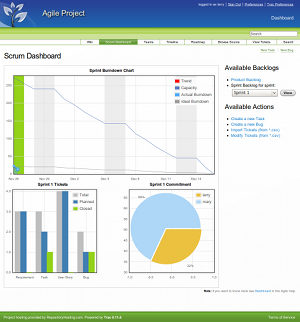
It has been a while, so thanks for your patience. We found out that many of you are Agile software developers and today we are launching a new feature just for you. We have integrated the Agilo plugin into Trac and it is now available in every Repository Hosting account. We have also added a few additional plugins to make using Repository Hosting friendlier.
Why Agile Software Development?
In 2001 a group of well-known software developers wrote the Agile Manifesto to protest the inefficient and unrealistic practices that were common in the almost ubiquitous waterfall model of software development. Agile methods recognize that projects are unpredictable and that there is often a disconnect between the developers and the customers. It focuses on people and working software over processes and planning. Software is developed iteratively, in short 1 to 2 week sprints, at the end of which the team delivers working software that can be shown to the customer for feedback. So why Agile software development? It forces you and your team to deliver working software in small increments, allowing you to skip a lot of the tedious and time-consuming project planning, instead adjusting your plan as you go.
There is nothing worse than spending 4 months developing an extremely complex piece of software (which you are very proud of), only to find out it wasn't exactly what the customer wanted. I know this firsthand, as I have had to throw away lots of code and have wasted many hours in the past, until I was introduced to the agile way of thinking.
For those of you who have never used agile methods, it's easy to start by using the Agilo plugin.
Agilo
Agilo is a Trac plugin developed by agile42 and is available on the new Plugins tab on your Project Settings page. It provides you with all the necessary tools for Agile programming, including defining teams, creating requirements, user stories, tasks, and bugs, a product backlog, sprint backlog, and burndown chart. Full documentation can be found here.
You will also notice that we've improved the theme and styles of Trac. These changes were inspired by the excellent theme that comes with Agilo.
Additional Plugins
In addition to Agilo, we have also added three other plugins for you to use. The Download Releases plugin provides you with a Downloads tab in Trac where you can post releases of your software for others to download. The Ticket Deletions plugin allows you to permanently delete tickets (as opposed to merely closing them). This is useful in case you get spam tickets added to your project. Finally, the Table of Contents macro allows you to create customized TOCs for your pages. Please check the Plugins tab for more details.
If you have any feedback on these new features, or if there is a Trac plugin you would like to see added, please send us a quick email and let us know at support@repositoryhosting.com. Remember, at Repository Hosting there is only One Plan, One Price no matter how many new features we add.
Enjoy your new agile tools!
Branding: Customization and Domain Masking
There is something undeniably powerful about branding that gets us excited and engaged. Today, we launch some really fun features, enabling you to fully brand your Repository Hosting account and projects.

Custom Colors and Logos
You can now specify custom colors and an optional logo for each of your projects as well as your account as a whole. If you modify the look of your account, all projects within your account will adopt the same changes by default. However, each individual project can also override these account defaults with their own logos or custom colors.
Domain Masking
Another feature that many of you have requested is the ability to mask your account behind your own domain names. This is now possible for both your account and for individual projects. For example, your account can now reside at a domain similar to the following:
http://projects.mycompany.com
A domain specified at the account level will be used by the entire account by default. However, specifying and visiting a domain at the project level automatically redirects the user to the project's Trac instance, conveniently skipping over the Account Dashboard.
Setting up domain masking is easy. You need only to provide Repository Hosting with your desired domain(s) as well as make some small changes to your DNS (create a new CNAME record).
How do I get started?
All of the options and detailed instructions for both interface customization and domain masking can be found under the Branding section of account and project settings pages.
We hope you enjoy these updates. Let the branding begin!
Shared Project Drives via WebDAV

Repositories, like Subversion and Git, are perfect for source code. But let's face it, every project has certain files which just don't feel like they belong in the source code repository. Who wants Word and Excel documents littering the source repository? Maybe you generate a lot of PSD's that you just don't want versioned because of the sheer space they would consume over time. We have an answer.
Today we are launching support for Shared Drives mounted via WebDAV. These drives share the same disk quota as the rest of your account, but files stored on them are not versioned. Additionally, these shared project drives can be easily mounted as a disk from any major operating system (Windows, Mac, Linux, etc.) and files can be directly manipulated. This is especially helpful for project stakeholders who may find version control clients too complicated to use.
Every Repository Hosting project now already supports Shared Drives. Simply reference the "Access URLs" from your Account Dashboard for more information on how to grant privileges and start using them.
Changeset Notifications: Twitter, Campfire, Basecamp and more...
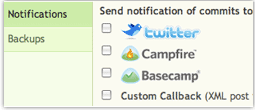
Changeset notifications via email are definitely handy, but we have found that there are often scenarios when having notification of commits can be useful in other contexts as well. It is now easy to receive notification of commits to your projects to a number of 3rd party services, including Twitter, Campfire and Basecamp.
In addition to these services, you can also enter a custom URL where Repository Hosting will POST essential information about the commit. This is especially helpful for those of you who are running continuous integration servers or other utilities that must be run after every commit.
To setup these services, simply visit your Project Settings page and enter the necessary credentials for any and all of the notifications you would like to receive.
Change Ticket Status with Log Messages
Did you know that you can affect ticket status using your commit log messages?
If a project is setup to process commit messages (this can be changed from the Project Settings screen), the following commands entered into your commit log message have the potential to affect ticket status:
close, closed, closes, fix, fixed, fixes
  The specified issue numbers are closed with the contents of this
   commit message being added to it.

references, refs, addresses, re, see
  The specified issue numbers are left in their current status, but
   the contents of this commit message are added to their notes.
When processing the log message, commit messages are searched for text in the following form:
command #1
command #1, #2
command #1 & #2
command #1 and #2
You can also have more than one command in a message. The following commands are supported. There is more then one spelling for each command, to make this as user-friendly as possible.
A fairly complicated example of what you can do is with a commit message of:
Changed blah and foo to do this or that. Fixes #10 and #12, and refs #12.
This will close #10 and #12, and add a note to #12.
Enjoy!
Send Emails Directly into Trac

Today, we have launched the ability to send emails directly into your Trac projects, automatically creating a new ticket for every email. Now, both your users and your development team can optionally contribute to the project without even having to login to the site!
You can create any number of email addresses within your account, each routing to a single project. Each address can specify ticket field values for every newly created ticket (i.e. owner, milestone, component, version, etc.). Email addresses can also be configured to be public (accepting email from anyone) or they can be limited to only accept mail from those users explicitly involved in the project.
All emails are created with the following format: address@subdomain.repositoryhosting.com.
Your users can certainly email directly to an address in this format. However, in many cases, it may be more appropriate to forward email to this address. For instance, let's say you wanted to create an email bugs@myproduct.com. You could create this email using the mail server for your and then automatically forward all email sent to this address on to address@subdomain.repositoryhosting.com.
To configure email addresses for your account, simply visit the "Account Settings" page and click the "Incoming Emails" menu item.
Automated Backups to Amazon S3
It never ceases to amaze us how some of our competitors like to keep customer data out of the hands of the rightful owner: the customer! Many of our competitors actually charge you (or at minimum make it very difficult) to download project backups or dump file of your repositories. We find this inexcusable.
At Repository Hosting, we treat customers like we want to be treated. Thus, your data belongs to you, the customer, who should never feel locked in to Repository Hosting as its provider. To that end, we have some important new features to share with you.
Automated Backups
It is now possible to schedule automated backups for any of your projects on a daily, weekly, or monthly schedule. Whenever a backup is created, project administrators will immediately receive a notification and the backup can easily be downloaded from the web interface. You can, of course, still generate a backup manually at any time.
Amazon S3 Integration

Now, here comes the cool part. You can also provide Repository Hosting with the credentials for an Amazon Web Services account and we will automatically upload all project backups directly to an S3 bucket of your choosing. This guarantees that your data is always under your control when you need it, not when it is convenient for your hosting provider to surrender it.
That's right. Automated backups, including Amazon S3 integration, are now available to all Repository Hosting accounts. We are committed to bringing you these and more top shelf features. Remember, at Repository Hosting there is only One Plan, One Price. Enjoy!
Trac XML-RPC and Eclipse Mylyn Integration
It has been just about a month since our official launch. Thank you for your overwhelming response to our approach to hosting your Git and Subversion repositories! We have had a tremendous number of signups and your quality feedback has already helped to shape our development.
One of the more common requests from you all has been support for the Trac XML-RPC plugin. We are glad to say that support for this plugin has now been deployed across all Repository Hosting projects.
Mylyn and Eclipse Integration

One of the most common uses of the Trac XML-RPC plugin is to integrate your Trac project directly into Eclipse using Mylyn. Mylyn makes it simple for you to manage your tickets from right within your IDE without ever having to task-switch out to your web browser. This is very cool for you Eclipse people.
Other Uses
Mylyn is only one of the potential ways to leverage the XML-RPC plugin. You can now access and manipulate all of the information stored in your Trac project programmatically from your language of choice. The possibilities for integration into your existing systems are endless.
To begin using the XML-RPC API, for Mylyn integration or otherwise, each accessing user (with the exception of project administrators) must be given the "XML_RPC" permissions. This can be done from the "Admin" tab from within any of your Trac projects.
For more information on how to use the XML-RPC plugin, along with libraries for specific languages, please visit the official page for the XML-RPC project.
Stay tuned. We have more to come very soon!
Repository Hosting Reforms Git, Subversion Hosting Industry
We should have written this blog entry three years ago -- in fact, we should have started Repository Hosting three years ago.
We know this because during the last three years, we have tried or used practically every Trac, Git, and Subversion hosting service out there. And to be honest, until six months ago, all we had to show for our effort was frustration. We decided to find out why were so frustrated and discovered three distinct answers.
First, so many of the Git and Subversion hosting services are just not reliable. We have tolerated too much downtime for too long. The bottom line is that companies in this industry have tried to cut costs by adopting approaches to infrastructure that are simply not reliable.
Secondly, our industry seems to be full of people who write a small amount of glue code around a handful of open source utilities and charge $25/month for it. We simply do not believe that the value added by these companies can possibly justify these kinds of prices.
Thirdly, and probably the most frustrating thing of all, too many companies obscure their real prices behind complex plans and feature matrices. They charge people like us more money when we have three programmers instead of two, or fifteen projects instead of ten, or want to do something simple like download a backup.
It has to stop -- and we are just the team to stop it.
Repository Hosting confronts each of these issues head on...
- Reliability: We have leveraged our extensive knowledge of Amazon EC2 to create a reliable, scalable and cost-effective hosting platform at Amazon.
- Integration: We have chosen to integrate well-established, open source, standards-compliant products in a way that is truly seamless.
- Pricing Transparency: Finally, we are introducing transparent pricing to the Git and Subversion hosting industry. One Plan, One Price: $6/month (plus $1 for every gigabyte of storage above 2GB). Every feature, every security consideration, every positive support experience is yours.
Are you a solo freelancer with a few active projects over the past year? One Plan, One Price means $6/month. Are you a small web design firm with 15 people and hundreds of projects for which you are responsible? One Plan, One Price means $6/month.
We like to think of ourselves as your own personal team of renegades, bucking mediocrity to bring you the absolute best software project management hosting. Take advantage of our 30 day free trial and you too will wish we had launched Repository Hosting three years ago.
Yours Truly,
The Renegades
of Repository Hosting


